Building a Circular LCD Clock with a Raspberry Pi
A step-by-step guide to building a wall clock from a circular LCD screen and a Raspberry Pi, with custom clock faces and touch interactivity.
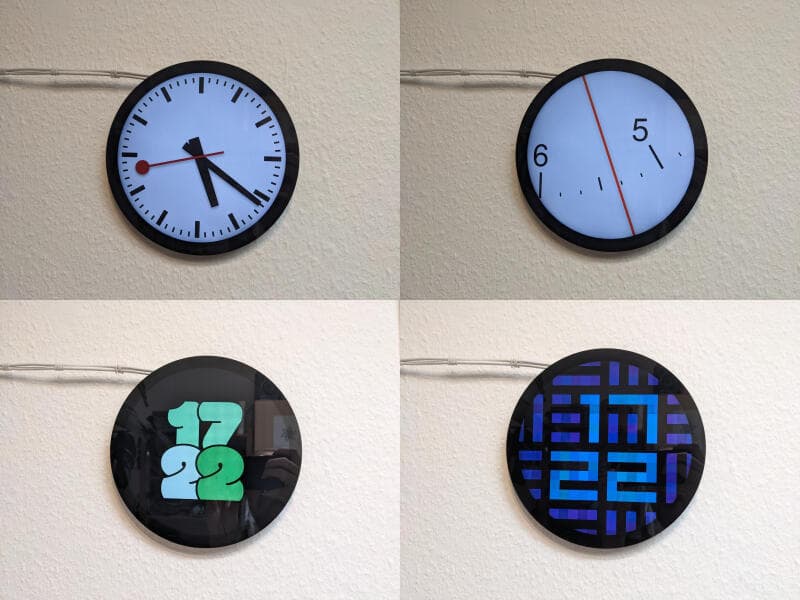
If you've ever wished your kitchen had a better clock than the oven display, here's a project worth considering. A developer recently built a wall clock using Waveshare's 7-inch circular LCD (1080x1080 pixels) and a Raspberry Pi. The result is a fully customizable clock face that can be coded from scratch, with multi-touch support for interactivity.
Hardware Stack
The core components are straightforward: a Waveshare circular LCD, a Raspberry Pi 3B+ or 4 (the Pi Zero 2's 512MB RAM proved insufficient for a modern browser), a microSD card, and a reliable USB-C power supply. The author warns against using random phone chargers—undervoltage throttling can be diagnosed via vcgencmd get_throttled. An official Raspberry Pi power supply solved that issue.
Assembly is simple: connect the Pi to the screen's "Touch" USB port (the "Power" port can stay unused). The author chose white cables to let the black screen stand out against a white wall, and mounted the Pi on a shelf rather than directly on the screen to keep the profile thin.
Software Setup
Raspberry Pi OS is flashed using the official imager. Remote control is handled via VNC (enable it in Preferences → Control Centre → Interfaces), and the author provides a bash script to quickly connect. Touch gestures are managed with Firefox's Touchscreen Swipe Navigation add-on for back/forward navigation and pull-to-refresh. The screen's hardware button cycles through five brightness levels, but software dimming is also possible: on Pi 3, gammastep works; on Pi 4/5, a custom Python script (published on Codeberg) talks directly to the screen's USB interface to set brightness between 0 and 100.
Custom Clock Faces
The easiest way to display a clock face is to open a browser in fullscreen. The author built several faces, available at clocks.blinry.org: a Swiss railway clock with the characteristic minute pause, a "Minimalist Time Scale" that zooms in on 12-hour marks for precision, a cartoony face using the Modak font, and a squared design inspired by Pebble watchfaces. Each is implemented in HTML/CSS/JavaScript, making them easy to modify or extend.
This project is a solid example of combining inexpensive hardware with web technologies to create a functional, personalized device. If you're comfortable with a Raspberry Pi and basic web development, you can have a unique clock on your wall in an afternoon.
Discussion
0 Comments
Be the first to start the discussion.