Every Fast Write Moves Work Somewhere Else
A deep dive into where write durability actually happens—local SSD, network volume, or object store—and why the fastest benchmark numbers often hide the real cost.
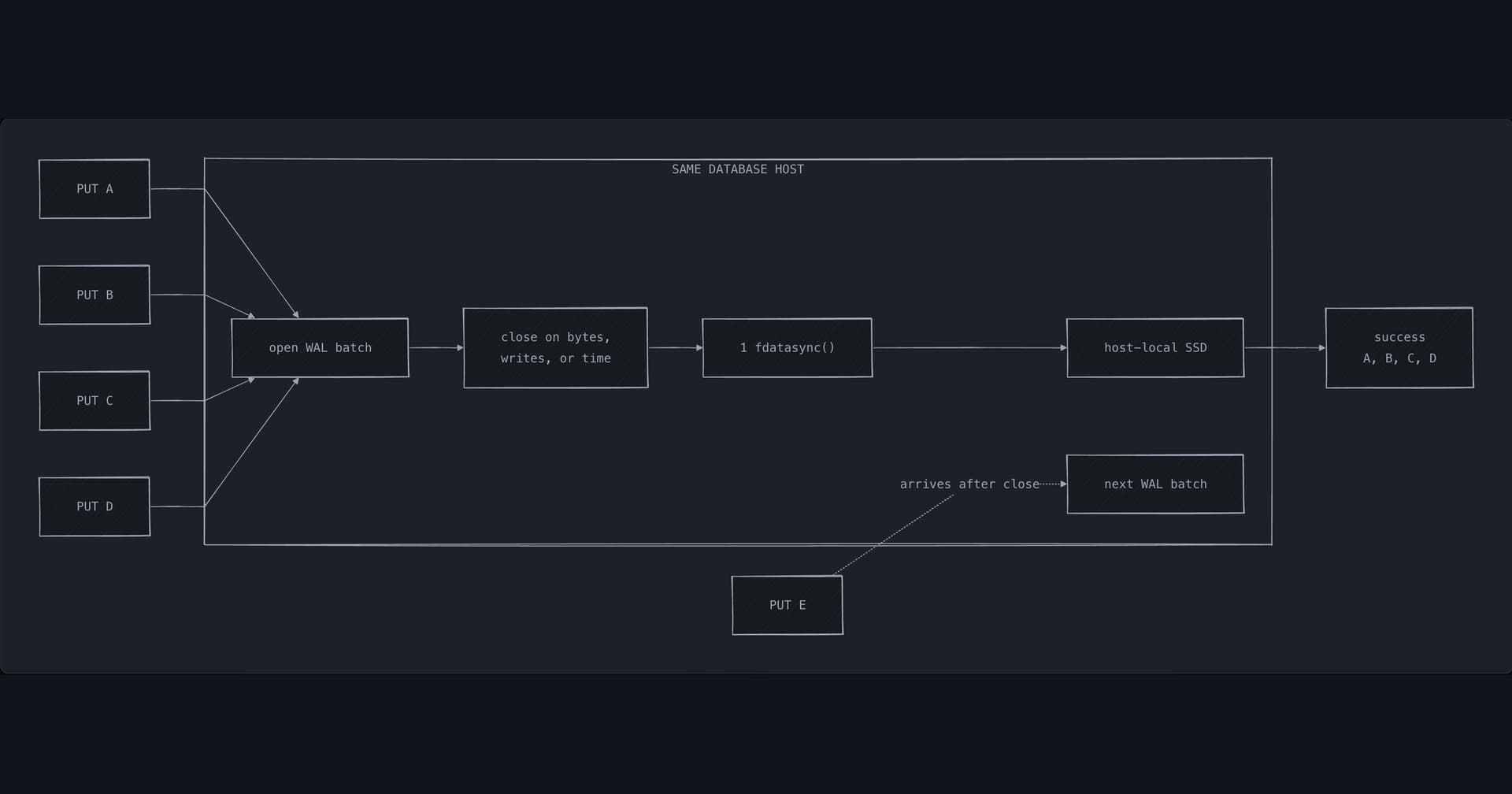
Every storage engine faces the same question: what must finish before a write is acknowledged? The cheapest answer is to copy bytes into memory and return. The most durable answer waits for a remote storage service or a quorum of database servers. In between sits the local SSD, which survives a process crash but not a host failure.
The author, Shayon, walks through the tradeoffs with a clear framework: separate the client PUT (the database request) from the object PUT (the HTTP request to object storage). Once you separate those, you can trace exactly where latency and durability are being traded.
The local WAL illusion
A host-local NVMe SSD is fast—maybe 0.1 ms to 1 ms for fdatasync()—but it only protects against process or kernel crashes. Lose the host, lose the write. An object store like S3 can be 10x slower (Turso measured 6.4 ms average for a 4 KB PUT to S3 Express One Zone), but the storage service owns durability once the PUT succeeds.
The gap is tempting: a 50x speed difference is a real benchmark result, but it's not a property of every NVMe device and object store. The two paths survive different failures.
Batching flushes
Calling fdatasync() after every write limits throughput to the device's flush rate. A serialized 1 ms flush allows roughly 1,000 flushes per second. Batching multiple writes into one flush—closing the batch on bytes, writes, or time—shares the cost. But batching introduces its own tradeoffs: the earliest request waits longest, a flush error fails the entire batch, and a timed-out request may already be in a batch that later reaches disk.
Beyond the host
If you want to survive a host failure, you need another copy. A durable network volume can look like a local block device but puts network latency into every fdatasync(). An object store moves the durability boundary to the storage service. A replicated WAL puts copies on other database servers. Each option moves work back into the client-visible write path.
The author's key insight: an unlabeled latency chart is meaningless. You need to know which operation paid for the speed, what can still be lost after success, and how much unfinished cleanup the system tolerates.
An NVMe latency number is incomplete without its acknowledgment point. Did the timer stop after copying bytes into memory, after syncing 1 local SSD, or after a remote volume acknowledged the write?
| Acknowledgment point | Survives | Latency | Typical use |
|---|---|---|---|
| Memory copy | Process crash | Microseconds | Non-durable caches |
| Local SSD fdatasync() | Process/kernel crash | 0.1–1 ms | WAL, single-host DBs |
| Network volume fdatasync() | Host failure, but maybe not datacenter | 1–10 ms | Attached volumes, EBS |
| Object store PUT | Datacenter failure (with replication) | 5–50 ms | S3, GCS, Azure Blob |
| Replicated WAL (quorum) | Multiple host failures | 10–100 ms | Distributed databases |
Discussion
0 Comments
Be the first to start the discussion.