Six Stations, Six Ways to Die: A Request's Journey for Survival
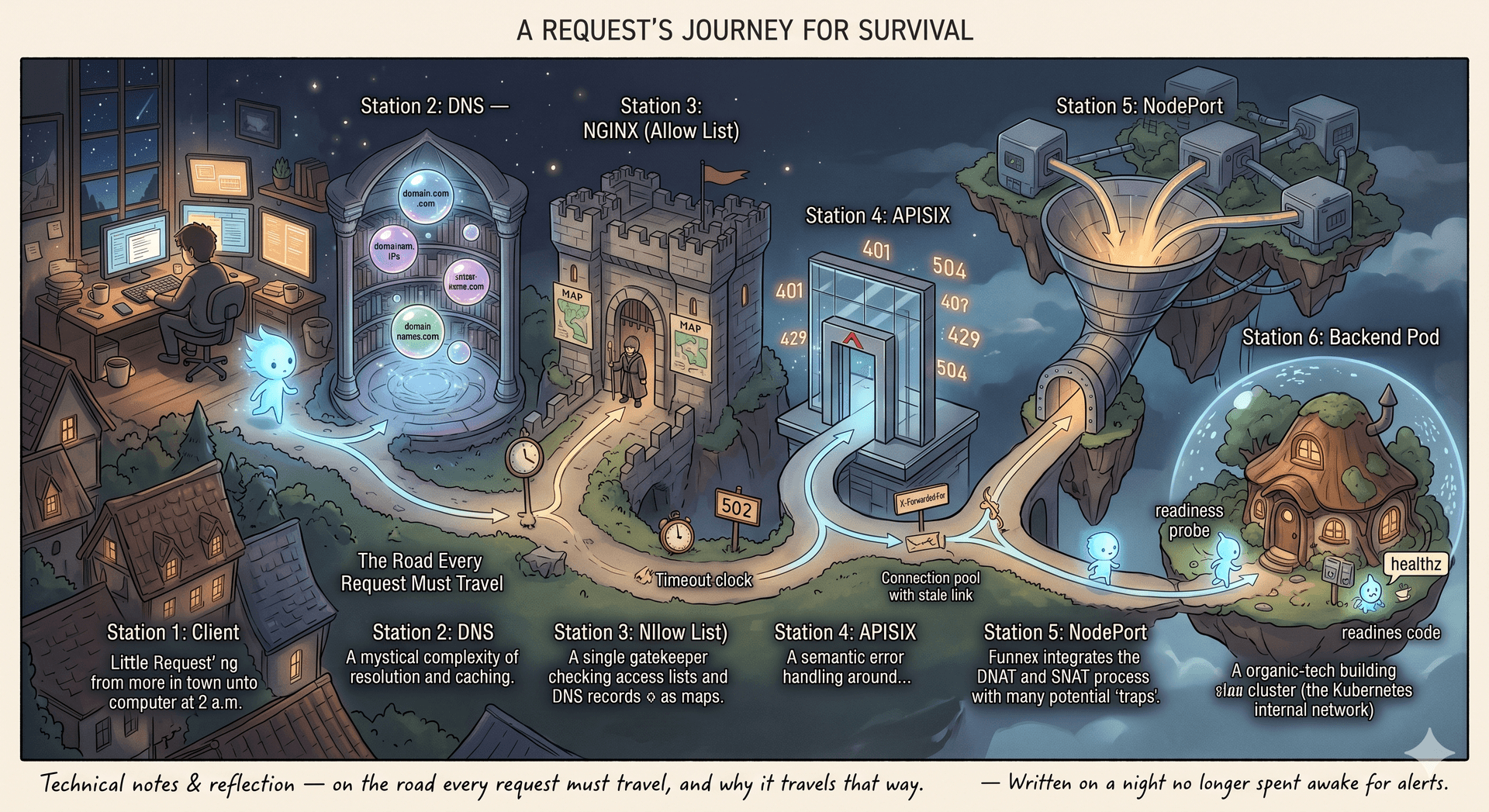
Prologue: Why must we understand this road?
There are nights when you sit before the screen at two in the morning, staring at a cold line of timeout, asking yourself: where did this little request die, so quietly that it left behind not a single line of log?
The alert fires in the dead of night. The API returns timeout. You open the service logs — spotless. Not one error, not one stack trace. As if the request set off and dissolved into thin air, never once touching the place where the code actually runs.
That moment taught me something that later became a survival principle: to debug a distributed system, you must understand the physical road a request travels — not the road you imagine in your head.
We tend to draw a straight arrow in our minds: client → server. But in reality, between the two ends of that arrow lies a whole row of gates. Each gate has its own keeper with its own rules, memory, and temperament. A request does not "fly straight" — it is forwarded, inspected, address-translated, load-balanced, one leg at a time. And at each leg, it can die in a completely different way.
This article is where I note down everything I understand about that road. The concrete architecture we'll dissect:
[Client] → [DNS] → [nginx (Allow List)] → [APISIX] → [NodePort] → [Backend Pod]
One important detail to pin down from the start: in this architecture, both nginx and APISIX live OUTSIDE the Kubernetes cluster. The cluster exposes just a single door to the outside world — the NodePort. Why it's designed this way, and what consequences it carries, will become clear at Station 5.
Station 1 — Client: the journey begins before the first byte leaves the machine
What actually happens
The first "aha": when you call an API, the request doesn't fly off immediately. It must go through a chain of preparation, most of which happens right on your own machine.
Step 1 — Name resolution. First the client must learn which IP api.example.com maps to. It asks the DNS layer (Station 2). But before reaching out, it checks its local cache.
Step 2 — Establish the TCP connection. With an IP in hand, the client opens a TCP connection via the three-way handshake (SYN → SYN-ACK → ACK). This is why every new connection costs a network round-trip just to say hello, before any real data is sent.
Step 3 — TLS handshake (if HTTPS). With HTTPS, after TCP comes one more ritual: exchanging certificates, negotiating the cipher, deriving the session key. That's another one or two round-trips.
Why do keep-alive and connection pools exist?
Because the three steps above are expensive. If every request had to redo the TCP handshake and then the TLS handshake from scratch, latency would be brutal. So the client (and every proxy downstream) uses keep-alive: holding the connection open after a request finishes, so the next request can reuse it. A "connection pool" is a basket of such already-open connections.
This is also the seed of a subtle class of bugs: the stale connection. The server on the other side quietly closes the connection (timeout, restart), but the client hasn't received the close signal yet. It still thinks the connection is alive, sends a request into the dead pipe, and sits waiting until timeout.
Where it tends to die: A stale connection in the pool. Especially common after a backend restarts while the client/proxy holds the connection too long.
Tools at the scene:
curl -v https://api.example.com/
# Read closely: "Re-using existing connection" (reusing)
# vs "Trying <ip>... Connected" (opening a new one)
Station 2 — DNS: why does "I changed the IP but it still hits the old server"?
What DNS does, and why it must cache
DNS translates a domain name into an IP. Sounds simple, but the global DNS system serves trillions of queries a day. If every query had to travel all the way to the root servers, the system would collapse. So DNS is designed to cache at every layer — and this is the key to understanding all of its tragedies.
TTL (Time To Live) is the number a DNS record declares about itself: "remember me for N seconds, don't ask again before I expire." Each cache layer honors this number in its own way.
Why doesn't an IP change take effect immediately?
Imagine you change the backend IP at 14:00, with TTL = 300 (5 minutes). What happens?
The client OS cache: still holds the old IP until TTL expires.
The ISP's resolver: keeps its own copy, expiring at a different moment (because it cached at a different time).
CDNs, intermediate proxies: yet more copies.
The result: throughout the TTL window, some traffic goes to the new IP, some still flows to the old one — the server you just shut down. This is why DNS bugs are often "half" bugs: half the requests succeed, half fail. And that very "half-ness" makes them maddening to diagnose — because when you retry, you often hit the half that works.
The operational lesson
Before changing the IP of an important service, lower the TTL to something small (a few dozen seconds) hours in advance, wait for the old TTL to expire across the network, then make the change. After it's stable, raise the TTL again to reduce load. A basic technique, but easily forgotten.
Where it tends to die: You changed the server but part of the traffic still hits the old IP during the unexpired TTL window.
Tools at the scene:
dig +short api.example.com          # the IP currently being resolved
dig api.example.com | grep -A1 ANSWER  # see the remaining TTL — counting down to zero
Station 3 — nginx (Allow List): the killer that leaves no trace
This is the station I want to dwell on longest, because this is where my 2 a.m. request died — and it died in a way that very few resources explain properly.
nginx here is the outermost layer: a reverse proxy with an allow list controlling who passes. There are three styles of allow-list config, and understanding why each behaves differently is what matters.
Style 1 — Filter by source IP, and the "wrong person" trap
location /api/ {
    allow 10.0.0.0/8;
    deny  all;
    proxy_pass http://apisix_upstream;
}
The ngx_http_access_module checks the IP of the incoming TCP connection. The problem: if nginx sits behind another load balancer, the TCP connection nginx receives is from the LB, not from the client. At the network level, the real client has "vanished" behind the LB.
Why? Because at the TCP layer, each hop only sees the hop immediately before it. The LB opens a new connection to nginx, so nginx only sees the LB's IP. The real client IP is tucked into the X-Forwarded-For header at the HTTP (L7) layer — but allow/deny operates at the connection layer, so by default it ignores that header.
The fix — tell nginx to trust the header to restore the real IP:
set_real_ip_from 10.0.0.0/8;        # only trust XFF when the connection comes from the internal LB
real_ip_header   X-Forwarded-For;
Note that set_real_ip_from is critical for security: only trust the header from sources you control, otherwise an attacker could spoof X-Forwarded-For to bypass the allow list.
Style 2 — The DNS-cache trap: why does nginx hold a dead IP?
This is the most valuable part. By default, when proxy_pass contains a static domain name, nginx resolves the DNS exactly ONCE at config-load time, then caches that IP until the next reload.
proxy_pass http://api.internal.example.com; # ← resolved once, remembered forever
Why does nginx do this? Because its design philosophy is absolute speed. Resolving DNS for every request would add latency and a dependency on an external service. So nginx chooses to resolve up front at startup, so every later request spends zero milliseconds on DNS. A reasonable trade-off — until the backend changes IP.
In the Kubernetes / cloud world, backend IPs change constantly: Pod restarts, autoscaling, failover. nginx, meanwhile, stubbornly clings to the IP from startup. The symptom is exactly my 2 a.m. story: intermittent 502/504, calling a "ghost" address where no one lives anymore — while the config looks perfectly correct.
The fix, and why it works:
resolver 10.0.0.10 valid=10s;       # declare a DNS resolver, trust the result for only 10s
set $backend "api.internal.example.com";
proxy_pass http://$backend;          # because it's a VARIABLE, nginx must resolve at runtime
The crux is an internal rule of nginx: when proxy_pass contains a variable, nginx can no longer resolve up front at startup (since the variable's value is only known at runtime). It is forced to use the resolver to ask DNS at runtime, honoring valid=10s to re-ask periodically. A small syntactic change that completely reverses the caching behavior.
Style 3 — Filter by domain with map, and why if is dangerous
map $host $allowed {
    default            0;
    "api.example.com"  1;
    "~^.*\.internal$"  1;   # regex — one wrong character and you leak or wrongly block
}
server {
    if ($allowed = 0) { return 403; }
}
map runs efficiently because nginx builds a lookup table at startup. But if inside a location block is famously dangerous ("if is evil") — the reason is that if in nginx is not an ordinary conditional statement; it intervenes in the internal config-selection mechanism, leading to counterintuitive behavior when combined with other directives. Using if at the server level for something simple like return is safe; cramming complex logic into if inside a location is fragile.
Where it tends to die: Silent
403from a misconfigured realip (Style 1), or502/504from a dead DNS cache (Style 2 — the quietest killer of them all).
Tools at the scene:
nginx -T # dump the ENTIRE merged config — see the real allow list after all includes
A golden trick — add $upstream_addr to your log format to see which IP nginx actually connects to:
log_format up '$remote_addr -> $host -> $upstream_addr status=$status';
If $upstream_addr points to a dead IP → you've just caught the DNS-cache bug red-handed.
Station 4 — APISIX: why are errors here "kinder"?
nginx vs APISIX — what's the difference?
A natural question: we already have nginx, so why also APISIX? (Amusingly, APISIX is itself built on top of nginx + OpenResty.) The answer lies in the level of intelligence.
nginx in the role above mostly does low-level work: forwarding, IP filtering, domain filtering. APISIX is a full API Gateway, operating deep at layer 7 — it understands HTTP semantics and manages the API lifecycle: routing by path/method/header, authentication (JWT, key-auth, OAuth), rate limiting, request/response transformation, observability, through a dynamic plugin system configurable at runtime (usually via etcd) without a reload.
In other words: nginx is the gatekeeper, APISIX is the building manager.
Why are errors from APISIX easier to diagnose?
Because they are intentional, semantic errors. Unlike the silent death of a DNS cache, APISIX usually states its reason via the status code:
401 Unauthorized— missing or wrong credentials.403 Forbidden— valid auth but insufficient permission.429 Too Many Requests— rate limit exceeded.502 Bad Gateway— "I called upstream but it didn't answer properly."504 Gateway Timeout— "I called upstream but waited forever with no reply."
Separating responsibility — the most important debugging skill here
Status | Meaning | Whose fault |
|---|---|---|
| Code processed the request and threw an exception | Backend Pod — logic/code error |
| The gateway reached upstream but got a broken response / refused connection | The APISIX → backend path, or backend crash |
| The gateway called upstream but ran out of waiting time | Backend too slow, or congested path |
Understanding this difference saves hours: see 502/504 and don't sit reading code (the code didn't even get to run), inspect the network path and backend health instead. See 500 and only then open the code.
Where it tends to die: Mistaking
502(network/upstream error) for500(code error) — digging in the wrong grave.
Station 5 — NodePort: the single door, and why it's both convenient and dangerous
This station carries the biggest "aha", and is where the architecture's design reveals its deep trade-offs.
Context: two worlds separated by a border
nginx and APISIX live outside the cluster. The backend Pod lives inside. Between them is a network border: the K8s internal network (Pod network) is usually not directly routable from outside. So how does APISIX (outside) reach a Pod (inside)?
Kubernetes offers several ways to expose a service externally. Here we use NodePort — a Service type that opens a fixed port (range 30000–32767) on every node of the cluster. Calling <any-node-ip>:<nodeport> reaches the service.
APISIX declares its upstream pointing at node-ip:31080. That's it — that's the entire "service discovery" in this architecture. So simple it needs no Ingress Controller, no dynamic discovery mechanism at all.
Reading a line of kubectl get svc — and understanding each number
NAME          TYPE       CLUSTER-IP     PORT(S)        AGE
backend-svc   NodePort   10.96.12.34    80:31080/TCP   30d
The cluster 80:31080/TCP tells a whole story:
80— the ClusterIP's port, for those calling from inside the cluster (10.96.12.34:80).31080— the port opened on every node, for those calling from outside (node-ip:31080).
What makes newcomers pause: NodePort does not replace ClusterIP, it stacks on top of it. Every NodePort Service implicitly has a ClusterIP. Why? Because K8s's internal mechanism still needs the ClusterIP for routing — NodePort is just an "expose-to-outside" layer bolted on top. The consequence: your backend has multiple entry paths coexisting, not a single choice.
The core "aha": NodePort is a funnel, not an address
This is the most subtle point, and where understanding the underlying mechanism matters.
When APISIX calls node-A:31080, the Pod that actually handles it may not be on node A. The underlying mechanism: each node runs a kube-proxy process that pre-builds iptables (or IPVS) rules. When a packet arrives at node A's port 31080, that rule picks a destination Pod — possibly a Pod on node A, possibly a Pod on node B — then performs DNAT (destination address translation) and forwards the packet there. This is an "extra hop" between nodes, happening silently below the network layer.
With that mechanism understood, two big traps emerge:
Trap 1 — Don't hardcode a single node IP. NodePort opens on every node, but if APISIX only points at one fixed node IP, then the fate of the entire backend is tied to the health of that one node. That node dies → the entire backend "vanishes" to APISIX, even though Pods on other nodes are alive and well. This is a close cousin of nginx's DNS-cache trap: never treat a single address as immortal. The solution: put an L4 load balancer in front of the nodes, or give APISIX multiple node IPs with health checking.
Trap 2 — The source IP gets masked (why?). When a packet hops from node A to node B (where the Pod lives), node A must perform SNAT — changing the source address to node A's own IP. Why mandatory? Because the response packet from the Pod must return to node A (where DNAT happened) to be translated back, then returned to the client. Without SNAT the Pod would reply directly to the client, breaking the address-translation chain. The consequence: the backend sees the node's IP, not the real IP of APISIX/the client. Anyone needing real-IP logs for audit will struggle here.
The escape hatch is externalTrafficPolicy: Local — only routing to a Pod on the very node that received the packet, so there's no extra hop, no SNAT, and the source IP is preserved. But the trade-off: a node with no Pod won't receive traffic, and load distribution becomes less even.
The trade-off of the whole architecture
The "nginx/APISIX outside the cluster → NodePort → Pod" model is very simple and independent: no Ingress Controller, no dynamic service discovery, the gateway decoupled from the cluster lifecycle. In exchange, APISIX (the smart L7) must delegate backend load-balancing to kube-proxy (the content-blind L4). APISIX doesn't know which Pods are alive/dead, can't health-check down to individual Pods — it just knocks on the NodePort door and trusts kube-proxy to lead the way. This is the trade-off between simplicity and fine-grained control.
Station 6 — Pod: why does "Running" not mean "ready"?
After the whole journey, the wanderer reaches its destination: the backend Pod — where the code actually runs.
Two states newcomers often confuse
The final trap lies in the difference between "running" and "ready to serve":
Running only means the container has started and hasn't died. It says nothing about whether the Pod is ready to receive traffic. A freshly Running Pod may be loading a cache, opening connections to the DB, initializing — not yet able to serve.
The readiness probe answers the question "am I ready to receive requests?" The mechanism: K8s periodically calls an endpoint (e.g. /healthz) of the Pod. Only when this probe passes is the Pod IP added to the Service's Endpoints list — that is, only then is it brought into kube-proxy's load-balancing rotation. If readiness is misconfigured (or missing), kube-proxy may push requests into a not-yet-ready Pod → intermittent errors, working one moment and not the next.
The liveness probe answers the question "am I still alive, or have I hung?" If this probe fails, K8s kills and restarts the Pod. The trap: configure it too aggressively (timeout too short) and K8s will kill the Pod right in the middle of handling a heavy request — manufacturing instability with its own hands.
The key link: Endpoints is the bridge
Understanding that readiness controls Endpoints unlocks a powerful debugging tool. Endpoints is the list of Pod IPs the Service considers "ready". If this list is empty, every request into the Service falls into the void — even though the Pods are still Running.
Where it tends to die: A wrong readiness probe lets traffic flood a not-yet-ready Pod — especially common right after a deploy. Symptom: deploy finishes, errors flicker for a few minutes, then heal on their own (when the last Pod finally goes ready).
Tools at the scene:
kubectl get endpoints backend-svc    # the list of Pod IPs currently considered Ready
kubectl describe pod <pod-name>       # see readiness/liveness and recent events
kubectl get pod <pod-name> -o wide    # which node the Pod is on (cross-check the NodePort trap)
The autopsy: a lookup table for next time
Symptom | Suspect station | Why |
|---|---|---|
Changed server but still hitting the old IP | DNS | TTL not expired, multi-layer caches still hold the old IP |
Intermittent | nginx | dead DNS cache — needs |
| nginx | allow/deny sees the wrong IP — needs realip |
Clear | APISIX | intentional errors — read the message carefully |
| NodePort | the targeted node is dead |
Load skewed heavily toward one node | NodePort | hardcoded one node IP, not spread evenly |
Backend logs only the node's IP | NodePort | SNAT masks the source IP — consider |
Intermittent errors right after deploy | Pod | wrong readiness probe, Pod receives traffic before ready |
| Pod/Service | no Pod passes readiness |
And my 2 a.m. request? The culprit was Station 3 — nginx holding a dead IP because of a static proxy_pass. One config line missing the word resolver, traded for a sleepless night and a lesson carved into the bone.
Closing: slow down to go faster
The biggest lesson after that night was not a technical trick, but an attitude.
When a system breaks, our instinct is to lunge at what we're most familiar with — usually the code. But the wanderer passed through six gates before ever touching the code. The culprit could be hiding at any of them.
Good debugging is not guessing fast, but walking in sequence, never skipping. Trace the exact road the request traveled — client, DNS, nginx, APISIX, NodePort, Pod — and at each station ask exactly two questions: "Did the wanderer pass through here? And was it still alive when it left?"
Understanding a system deeply is not memorizing every directive, but understanding why each layer exists, what it trades off, and how it will betray you when misunderstood. Every layer in this article — from DNS's TTL, to nginx's cache, to the NodePort funnel — is a decision trading off speed, simplicity, and control. Understand that trade-off, and you not only fix bugs, you design better systems.
A request, if we know how to listen, will tell the whole story of its own death. We need only the patience to walk beside it the entire way — like a nostalgic wanderer, tracing each footprint along a road grown old.
— Written on a night no longer spent awake for alerts.
Related reading

Where Does Real Knowledge Come From in the Age of AI?
AI answers everything with the same confident tone, whether right or wrong. The only way to catch its errors is to already know the domain. This essay maps six knowledge sources—books, primary documents, vetted updates, courses, people, and practice—and argues that cross-referencing them is the…

I Built a DNS Server to Understand the Thing I'd Blindly Trusted for Ten Years
There are technologies you use every single day without ever looking them in the eye. For me, DNS was one of them. I'd been typing domain names for a decade. Buying domains, pointing records, waiting for "propagation," cursing when it didn't come up, rejoicing when it did — without really understanding why it came up. DNS, to me, was like the light switch on the wall: flip it and the room lights up; if it breaks, call an electrician. Until one deploy night, the site went down. ping to the IP was fine. curl straight to the IP returned the page. Only the domain name sat there in silence. I stared at it and realized something a little humiliating: I didn't know where to even start fixing it, because I had never truly understood the thing that was broken. So I did what probably only an engineer would find reasonable: instead of skimming the docs, I sat down and wrote an entire DNS server in Rust. The project is called mini-dns. This post is what a black box told me once I finally opened it up.

Nginx Isn't Acting Up — You're Just Reading the Config Wrong
There's a funny paradox among developers: we'll happily argue for a week about whether the backend should be written in Rust, Go, or Node.js — but when it's time to ship to production, 90% of us quietly type apt install nginx and stick it out front. Nginx is everyone's go-to gatekeeper — and also the thing that has people debugging until 2 a.m., still unable to figure out why one simple request keeps returning a 404. Here's the interesting part: the bug is almost never in Nginx. It's that we read the config file like a script that runs top to bottom — when that's not how Nginx works at all. This isn't a listicle of "common Nginx errors" for you to copy-paste onto your server. The goal is to hand you a mental model: to understand how Nginx thinks, so the seemingly magical traps below become predictable instead of leaving you staring blankly at the screen.
Discussion
0 Comments
Be the first to start the discussion.